
Make a 5-second vertical clip of a golden retriever surfing at sunset.
Prompt sent to EveryGen
A golden retriever riding a small surfboard on a gentle wave at sunset, slow motion spray, warm golden light, joyful, cinematic, no text
Claude AI video generator
Claude writes and reasons, but it does not render video by itself. Connect EveryGen and Claude can create the clip for you: describe the idea, Claude writes the full prompt, chooses a model such as Seedance or Kling and brings the finished video back into the conversation.
Go to claude.ai or open the Claude desktop app and sign in. Click your name at the bottom left, open Settings, then choose Customize and the Connectors tab. Click + Add and choose Add custom connector from the menu.
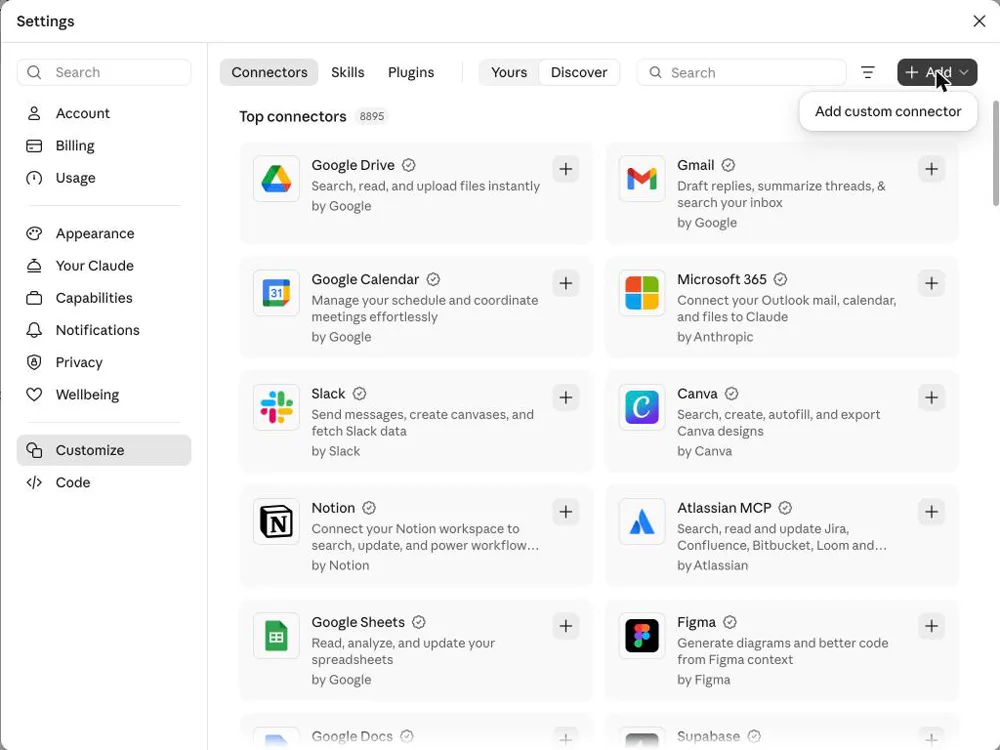
Type EveryGen in the Name field. Copy the address below and paste it into the MCP server URL field exactly as shown, with no spaces or trailing slash. Then click Continue:
https://everygenai.video/api/mcp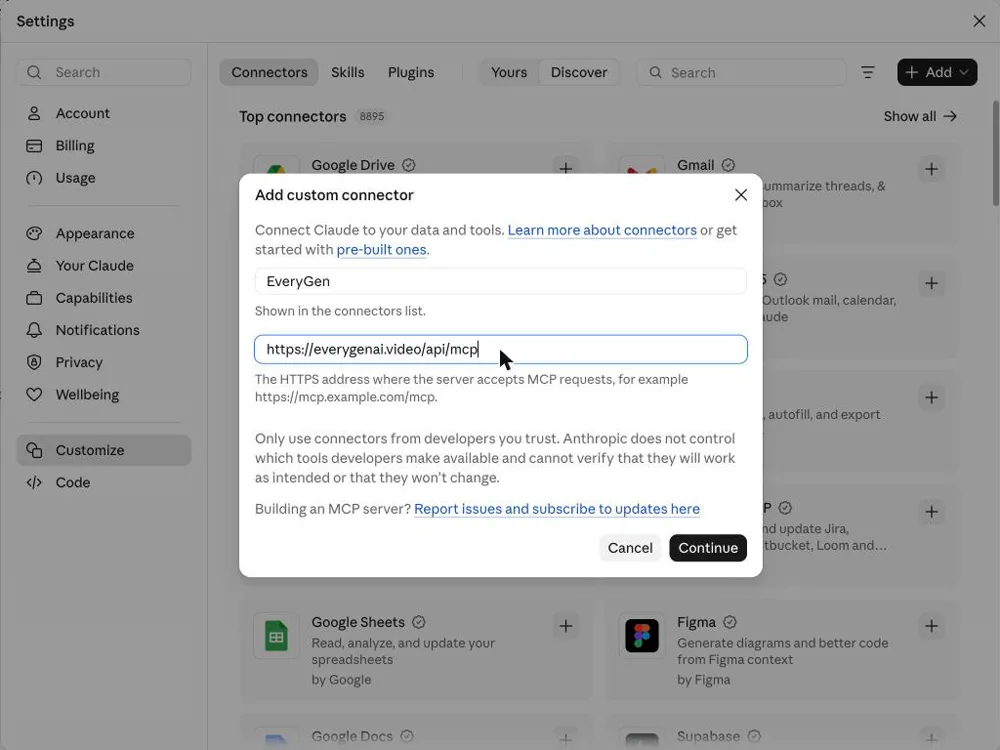
EveryGen now shows in your connector list. Click Connect. A sign-in page from everygenai.video opens. Log in with the EveryGen account whose credits you want to use, or create a free account. No API key is needed.
Click Allow on the permission screen so Claude can create videos and check your credits for you. When the window closes, the connector shows as connected.
Open a new chat, use the + menu, open Connectors and make sure EveryGen is on. Then try: "Make a 5-second vertical clip of a golden retriever surfing at sunset." Approve the tool call the first time. Claude writes the prompt, renders the clip (usually a minute or two) and shows it in the chat.
Done. Seedance 2.0 Mini, 9:16, 720p, 5 seconds. Here is your video.
Not by itself. Claude can write scripts and prompts, but it needs a video model behind it. With the EveryGen connector, Claude calls video models such as Seedance and Kling and returns the finished clip in the conversation.
Text-to-video clips and image-to-video clips from a public image URL: product shots, social clips, story scenes and intros. You choose the length, aspect ratio and resolution the model supports, or let Claude pick.
The same credits as on the website, based on model, resolution and length. Ask Claude to list the models and their credit cost per second before you start.
Yes. Free accounts can add one custom connector, so EveryGen works on Free as well as on paid plans. Video credits come from your EveryGen account.
No. It is a custom connector from EveryGen that uses the Model Context Protocol. Claude is a trademark of Anthropic; EveryGen is an independent product.
list_video_modelsLists every video model with its durations, resolutions, aspect ratios and credit cost per second.
generate_videoStarts a text-to-video or image-to-video job. Uses credits from the connected account; failed jobs are refunded.
get_video_taskChecks a job and returns the video link when it is ready.
Real results from the connector. Each clip came from the request on the left; the assistant turned it into the full prompt shown under the video.
Prompt sent to EveryGen
A golden retriever riding a small surfboard on a gentle wave at sunset, slow motion spray, warm golden light, joyful, cinematic, no text
Prompt sent to EveryGen
Luxury product shot: a glass perfume bottle standing on wet black stone, water droplets sliding down, slow orbiting camera, soft studio rim light, premium commercial look, no text or logos
Prompt sent to EveryGen
Cinematic drone shot gliding over a rainy neon-lit city street at night, reflections on wet asphalt, umbrellas moving below, moody blue and pink light, no text
Prompt sent to EveryGen
Stop-motion style: a small paper boat sails across a wooden desk past a coffee cup and pencils, warm desk-lamp light, playful and cozy, no text
Create your EveryGen account, connect it to Claude or ChatGPT, then ask for your first clip.