
24 Card Video Trend: What It Is and How to Make It With AI
The 24 card video trend explained: the 2 and 4 cards, the sports car reveal, where it started and how to make your own version from one photo of you or your pet.
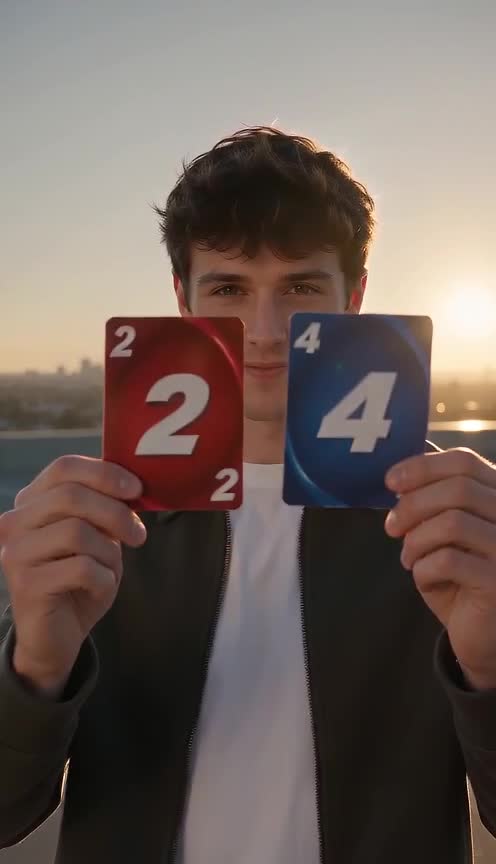
The 24 card video is a short reveal clip that spread on TikTok and X in autumn 2026. Someone walks toward the camera holding two cards, a 2 and a 4, flicks them at the lens, and a sports car is suddenly parked behind them. People also search for it as the 24 card trend, the 24 car trend or the unforgettable car trend. You do not need a car or a rooftop: upload one photo and the AI makes the reveal with you, your cat or your dog.
Make my 24 card video
What happens in the video
The clip runs about ten seconds and has four beats:
- The subject walks toward the camera on an empty rooftop parking lot at sunset.
- They hold up a red card with a 2 and a blue card with a 4 close to the lens.
- They flick both cards at the camera and the cards whip past it.
- The cards are gone and a sports car is parked behind them. They look into the camera and point at the car.
The "24" in the name is the two cards. The trick the format plays is the match cut: the cards cover the lens, and when they clear, the scene has changed.
Where the trend comes from
It began as a real clip filmed in a parking lot, where someone flicked two cards at the lens and a car appeared behind them. AI versions followed a few weeks later, with creators swapping in their own faces, pets and different cars, and the format spread under hashtags like #24cartrend. Tutorials from AI video tools started appearing at the same time.
How to make it with AI in three steps
1. Pick a photo. One sharp, well-lit photo of you or your pet looking at the camera. Waist-up gives the arms room for the card flick. Pets work too: choose a photo where the animal looks straight at the lens.
2. Upload it on the 24 card video page. Open the 24 card video generator, add your photo and press generate. The rooftop, the cards, the flick and the car are prepared for you, so there is no prompt to write. It makes an 8-second vertical clip at 480p with sound.
3. Download and post. Save the MP4 and post it to TikTok, Instagram Reels or YouTube Shorts. The clip has generated ambient sound and a whoosh, not a commercial song. Add a track from the platform's sound library if you want the music people use for this trend.
Tips for a better result
- Use a sharp, front-facing photo with the face large in the frame.
- Avoid group photos: the model has to choose who performs the reveal.
- The numbers on the cards are the hardest detail for a video model. If a run gets them wrong, generate again with the same photo.
- The car and the setting are the same every time. For a different car or location, describe it yourself in the video generator.
FAQ
Is it free? Generating costs credits: 48 credits for the default 8-second clip. The exact amount is shown on the generate button before you confirm, and failed generations are refunded automatically.
Can I use my dog or cat? Yes. The animal performs the same walk, card flick and point.
Is this the original video? No. It is an independent, AI-generated take on the format with your photo, not a copy of the original clip, and it is not affiliated with the creators of that clip.
Do I need to appear in it? No. Any clear photo works, including a pet or a friend who agreed to be in it. Do not upload photos of public figures or of anyone under 18.
Why is it called 24? The two cards show a 2 and a 4.